
Release Notes - 29th October 2025
New Features
Pick Mode control
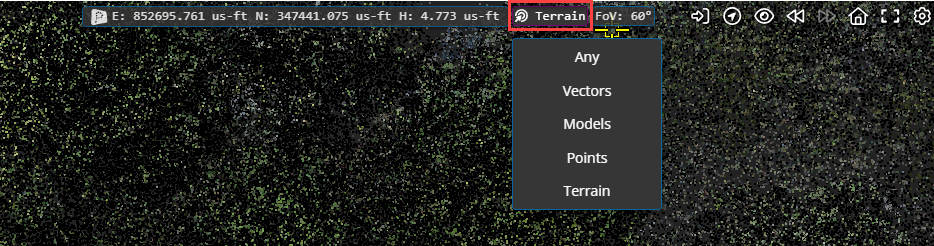
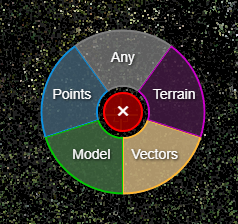
The viewer now has a more comprehensive option to control the pick mode of the mouse. You can choose between:
Pick Any (closest of any object type will be picked)
Point cloud
Vectors
3D Model
Terrain
There is a pick mode indicator at the top of the viewer window (next to the coordinate display). You can click on the to change the current mode.
There is also a quick access menu - you can access this by pressing the Spacebar in the viewer and using the mouse to select from the menu.
Note: the existing functionality linked to the Spacebar, to sync the 2D map view with the 3D view, now requires you to use SHIFT+Spacebar.
Improvements/Changes
Pointerra3D Core
General
Added a new option in Company Management to allow dataset admins to have the same permissions as company admins for project and data related actions such as clone, delete, archive and vault projects.
Updated KML importing to handle KML files with cascading styles.
For companies with API access, company admins can now view, copy and cycle user API keys.
Deprecated the option to set a project as public.
Record additional audit information for all changes made to shared links.
Support has been added to import IFC4X3 release candidate schemas (RC1, RC2, RC3, RC4). The IFC schema version is now shown in the dataset properties (IFC models only).
Improved support for processing large IFC models. Is now orders of magnitude faster in some cases.
Add support for importing .ifczip files.
Multiple improvements in the 3D tiling pipeline for CAD models.
Add Support for JP2000 ortho datasets
Improved error reporting for jobs that fail due to coordinates being out of range for the chosen spatial reference system.
Users can now edit the share links that they have created (previously only company admins could edit share links).
Added tags to bookmarks to allow filtering bookmarks by tags.
Allow specifying tags to filter the bookmarks shown in an embed link view.
Removed nodata values from XYZ files for DEM exports. Additionally, cropped out extra nodata values on the edges of custom tile DEM exports.
Embeds now have the option to add and open project in Pointerra button. The left sidebar can be configured to show only the bookmarks & POI panels.
Minimum length password requirements are now be enforced for shared link passwords.
When creating a new account from visiting a share link, the user is now automatically redirected back to the shared link after the email is verified.
Added an option to skip sending the initial invitation email when creating a shared link.
Portal UI
Show externally shared collections on the company sharing page.
Shared with me section now puts folder id into the url for collections that are shared with you. This then allows you to send a link to another person and they get linked to the collection
Allow configuring email verification when editing existing share links.
Disable browser autofill for password fields on the share link editing pages.
Added a new demo tab to home pages to show sample data (not shown if demo/public data is turned off for the company)
Added copyable jobid field on jobs page for companies with API access
Viewer
Enabled mouse picking on vectors to allow tools and cursor info to snap to vector data entities (points, lines)
All users can now export drawing layers (previously required download permissions). This allows all users (including share links) to create layers with the drawing tool and export to one of the supported formats.
Add support for rgb display mode if point cloud only has a single colour.
Added support for displaying constrained x and y axis measurements in scanview.
Streamlined the Scanview panel by moving some items into the options Scanview popover.
Scanview now has an option to flip the image to cater for cases when the scanner is "upside-down" when scanning (e.g. lowered into a manhole)
Detect if the user is using a 32-bit browser and warn them that the viewer is not fully supported on 32-bit browsers.
Ensure any current vector filters also apply to vector overlays on spherical image views.
-
Vector dataset style editing enhancements:
Moved styling UI out of the options menu and into its own panel
Split list of styles into feature types
Added close buttons to each popup
Added option to save and load styles from a company template (requires permission to be able to save a template)
Supports multi-layer vectors cases
Show template preview
Allow easy editing of the initial style (created from file import) without the requirement to create a whole new style.
Support for polygon fill style.
Add ability to only override certain parts of the style (eg. size only)
Add style modifiers (eg. point size scale) that modifies existing values
Allow users with tools permissions to create personal bookmarks (even if they don't have permission to create project-wide bookmarks)
The left panel UI has been updated to only show action buttons when the mouse is hovered over an item. This creates more space for item names and generally simplifies the view.
Lidar Calibrate
Added the ability to reprocess calibration jobs
Changed calibrate "Aircraft type" option to "Survey scale" to improve clarity
Photogrammetry
Added output image format options for photogrammetry orthomosaics (including JPEG2000)
Analytics
Added support for detection of some "Y style" transmission towers in poles n wires analytics.
Info tool will now show the pole diameter for any poles that have an estimated diameter.
Added option to use existing point classifications in P&W generation
-
Poles and wires viewing enhancements:
When you hover a pole or wire the width will increase to indicate you are selecting it
When you hover a feature on a pole with either the poles & wires editor or info tool, width will also increase to show you have selected an item on the pole/wire
Info tool can now be used on all features
Added colorize point cloud analytic that produces las/laz files colored by GIS imagery dataset. There is also an option to reimport the output files as a new point cloud.
Bug Fixes
Fixed a bug where custom terrain layers would sometimes not be active when project or bookmark was reloaded.
Fixed filename of downloaded photos not being set correctly.
Note - Platform Updates: 3D Models and Vectors
Over the past 6 months, both the 3D Model and Vector technologies used by the platform have been completely rewritten to deliver significantly greater scalability and expanded styling capabilities.
Vector Improvements
Vectors are now processed to render using our own level-of-detail (LOD) streaming technology, enabling the platform to handle much larger and more complex datasets efficiently. In addition, there is now comprehensive support for styling options that is consistently rendered across both the 3D and 2D views, giving users far more control over how vector data is displayed. The processing now retains a lot more of the original styling and attribute data when it is available in the uploaded file format.
3D Model Enhancements
3D Model datasets now take advantage of Pointerra’s own 3D tile generation code. This can result in major improvements for BIM-style data from IFC and similar formats, including:
Retention of attributes/properties on individual model elements
Display and filtering options that utilise the model hierarchy and element properties
Reprocessing Option
If you have older Vector or 3D Model datasets in projects that you still actively use, you may want to consider reprocessing them to take full advantage of these new capabilities and performance improvements.