
Project Advanced Search
This page lists all of the filters available for projects in the Data Browser.
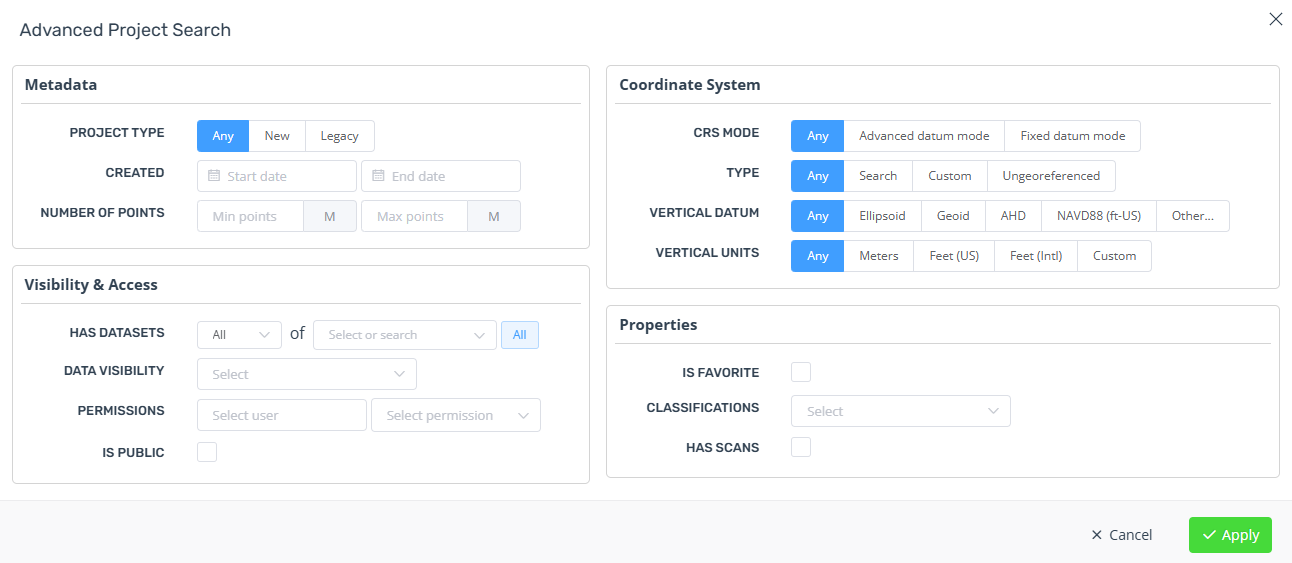
Metadata
Project type - Find or exclude legacy projects. Point clouds cannot be dynamically added or removed from legacy projects.
Created - Find projects created within a date range. You can also leave the start or end date blank.
Created by - Find projects that you created. Admin users can also find projects created by other users.
Number of points - Find projects with a total point count within a range. You can also leave the min or max fields blank.
Visibility & Access
Has datasets - Find projects that contain specific dataset types.
Data visibility - Find or filter out projects that don't have any visible data. These projects may have no datasets, or all the datasets have failed to import or are still importing.
Permissions - Filter projects by what permissions you have for them. Admin users can also filter by permissions of other users. Useful for ensuring your permissions are set up correctly.
Collections - Find projects in only one or more than one collection.
Is public - Find public projects.
Coordinate System
Use these filters to find datasets that match a specific coordinate system.
Click the CRS icon of a project to set this filter automatically.
Properties
Is favorite - Only show projects you have favorited/starred.
Classifications - Find projects with point clouds that have original classifications in the source files, or have been classified using Pointerra analytics.
Has scans - Find projects with point clouds that have structured scan data.
Has annotations - Find projects with at least one Drawing Layer annotation.
Has POIs - Find projects with at least one Point of Interest.